


Virgin Atlantic
4.358.00 Reviews
App Specs
- Version
- 1.7.0
- Updated On
- License
- Free
- Downloads
- 100,000+
- Developer
- Virgin Atlantic
- Categories
- Travel & Local
- Platform
- Android
Screenshots


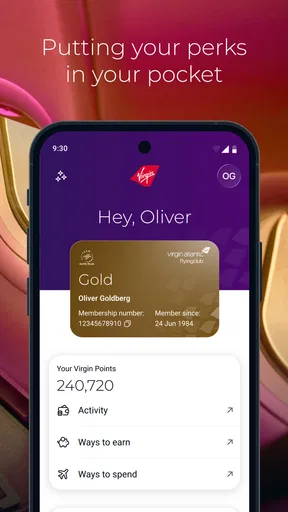
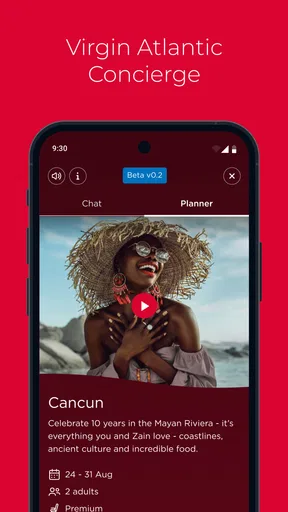
 Analysis by AppCompare
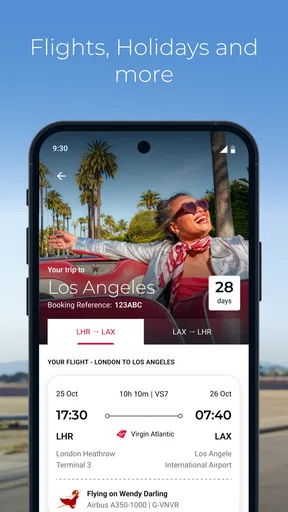
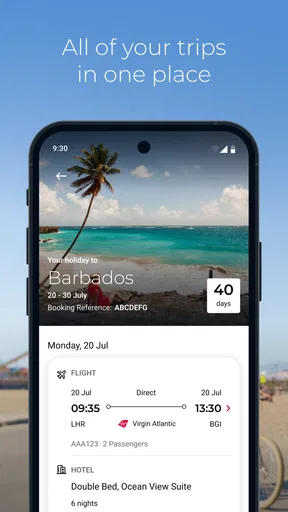
Virgin Atlantic is the kind of travel app I would keep installed for a trip where the airline itself is central to the journey, rather than treating it as a complete replacement for every travel tool on my phone. As a free Travel & Local app from Virgin Atlantic, it brings the airline’s flights and holiday planning into one mobile place. The appeal is straightforward: fewer browser tabs, quicker access to the journey I am actually taking, and a more direct route to airline-specific information.
My overall impression is positive, but practical. The app has a 4.3 average from around 938 ratings, and that feels consistent with its role: useful when the trip is connected to Virgin Atlantic, less compelling when I am comparing a wide range of airlines or building a complicated multi-provider itinerary. It is free, rated for Everyone, and available for devices running OS 10 or later. The current version is 1.7.0, so keeping the installation current is one of the first sensible steps before relying on it during travel.
Getting past the points where travel apps usually cause friction
I find the biggest travel-app headaches often happen before the journey: choosing the right place to check details, keeping booking information to hand, and knowing what to do if a screen stalls. I’d prepare those basics while I have time and a reliable connection, then use a simple backup routine for anything important. That groundwork makes it easier to judge where this app fits into the rest of a trip.
Start with the journey, not the download
The first mistake I would avoid is installing the app at the airport and expecting everything to fall into place immediately. Travel apps are most useful when they are prepared before the stressful part of the journey begins. I would install Virgin Atlantic while I still have reliable Wi-Fi, open it calmly, and look through the flight and holiday areas before departure day. That gives me time to notice whether I am using the correct account or booking details and whether the device has enough free space for a normal app update.
The developer is Virgin Atlantic, which matters because the app is designed around the airline’s own travel relationship rather than acting as a neutral search engine for every carrier. If I booked through another company, used several airlines, or am coordinating separate rail, hotel, and flight reservations, I would treat this app as one part of the plan. I would not assume that installing it automatically turns every unrelated reservation into one unified itinerary.
A useful preparation habit is to keep the booking reference, passenger name, and travel dates easy to access while setting things up. I am not suggesting that every screen will ask for all of these details at once; rather, having the original booking information nearby avoids the most common kind of travel-app delay: repeatedly switching between email, a browser, and the app to check a small detail. It also makes it easier to spot a typing mistake before concluding that the app is broken.
Check the basics before blaming the app
If a screen loads slowly or a journey does not appear, I first check the simple causes. I make sure the phone is online, switch between Wi-Fi and mobile data if one connection is unreliable, and close the app before opening it again. I also check whether the device meets the minimum operating-system requirement. Virgin Atlantic supports OS 10 and later, so an older phone may be the real limitation rather than the application itself.
Worth Reading Before You Choose

EA SPORTS FC Mobile 26 Is a Bigger Football Game, but It Takes Time

Flipboard Shows What News Apps Must Do Beyond the Feed

Switching to Android Auto Means Rethinking Your Driving Routine

Google Calendar Makes a Crowded Week Easier to Manage

Ludo King Makes the Most of the Minutes Between Plans

Baby Panda World Brings Quick Play to Modern Phones, but Its Game Library Feels Busy
Updates deserve attention too. The version shown for the app is 1.7.0, and airline apps can change alongside booking and travel systems. I would check the relevant app store before leaving home, especially if the app was installed months ago. An update is not a guarantee that every problem disappears, but running an old build makes troubleshooting harder because the screens and online services may no longer match.
I also prefer to test the app with the phone’s date and time set correctly. Incorrect device time can create confusing behavior with travel information, sign-in sessions, or pages that depend on current availability. This is a general device check rather than a special Virgin Atlantic setting, but it is quick and can prevent an unnecessary reinstall.
Why the first successful setup may still feel incomplete
There is a difference between opening the app successfully and having it ready for a real journey. I would make sure I can reach the relevant flight or holiday information, then take a moment to understand where I would return for it later. On a travel day, I do not want to explore every menu while standing in a queue. A short rehearsal at home is more useful than assuming that a familiar airline name means the interface will require no learning.
I would also avoid making the app my only source of important travel details. The sensible backup is the original confirmation in email or another secure place, plus the identification and payment information required for the trip. This is not a criticism of Virgin Atlantic specifically. Phones lose signal, batteries run low, and online services occasionally become unavailable. The app can make access easier, but a backup keeps a technical interruption from becoming a travel crisis.
Recovering when a booking or screen does not behave as expected
When something goes wrong, I use a fixed recovery order instead of tapping randomly. First, I confirm that the booking information was entered exactly as issued. Next, I check the connection and reopen the app. After that, I look for an available update and restart the phone if the problem affects more than this one application. This sequence is deliberately boring, but it separates account or booking issues from temporary app behavior.
If a particular page refuses to load, I would record what happened before trying a more disruptive fix: the screen I opened, whether other parts of the app still worked, and whether the same information was visible through the airline’s normal web or support channels. That comparison is valuable. If the website and app both show the same result, the issue may be connected to the booking or current travel situation. If the website works while the app does not, the app installation or device environment becomes more likely.
I would be cautious about uninstalling immediately. Reinstalling can clear local problems, but it can also remove convenient local access and force me to repeat setup while I am away from home. I would try closing the app, restarting the phone, checking connectivity, and updating first. If I do reinstall, I make sure I still have the booking information and any sign-in details needed to return to the journey.
Small workflow choices that make the app more useful
My preferred workflow is to use the app for airline-specific tasks and a separate travel tool for the wider trip. For example, if I am flying with Virgin Atlantic but staying at a hotel booked elsewhere, I would use this app to focus on the flight or holiday information connected with the airline, while keeping hotel directions and independent reservations in their original services. That division reduces the risk of assuming that one app has a complete picture of a trip assembled from different providers.
For a family journey, I would review the booking before travel and make sure each traveler’s details are represented correctly wherever the app displays them. I would not wait until boarding time to discover that I have been looking at the wrong passenger or reservation. The practical benefit here is not a hidden button; it is using the app as a checking tool before the pressure of the airport makes small mistakes more expensive.
For a holiday package, I would think of the app as a convenient access point rather than a substitute for reading the original booking confirmation. Package travel can involve details that are easy to overlook when viewed only through a compact mobile screen. I would use the app for quick reference, then return to the full confirmation when I need to verify a condition, date, or arrangement.
Another useful habit is to keep notifications and battery behavior in perspective. I would not assume that a notification alone is enough to manage a time-sensitive change. I would open the app and check the journey directly when the travel day matters, particularly after changing networks or spending a long period with the phone offline. A notification is convenient; it should not be the only confirmation I trust.
When the app is not the real cause
Airline information can change because of circumstances outside the application. A delayed page, a changed itinerary, or a missing option may reflect the booking system, airport operations, availability, or the timing of the request rather than a defect in the mobile interface. If the same information appears through another official Virgin Atlantic channel, I would avoid repeatedly reinstalling the app and instead follow the airline’s normal support route.
There is also a difference between an app error and an expectation mismatch. Virgin Atlantic is a focused airline app, not a universal travel marketplace. If I am searching across many carriers, comparing every possible fare, or managing a trip whose main transport provider is not Virgin Atlantic, another travel search app may be more efficient. In that situation, the app is not failing; it is simply not the right primary tool.
The same applies to complex group travel. If several people have separate bookings, different airlines, or different return dates, I would use Virgin Atlantic for the reservations connected to it and maintain a separate master itinerary. Trying to force a mixed trip into one airline app can create confusion about which information is authoritative. The more providers involved, the more important it becomes to keep a clear overall record outside any single carrier’s application.
What I like about the focused approach
The strongest quality here is focus. Because the app comes directly from Virgin Atlantic, I would choose it when I want an airline-specific mobile companion rather than a broad comparison service. The store summary covers flights, holidays, and more, and that combination makes sense for travelers who want to stay within the Virgin Atlantic ecosystem while planning or checking their journey.
The free price removes an obvious barrier, and the Everyone age rating makes it suitable for ordinary household use. The install figure is over 100,000, which suggests that it has reached a meaningful group of travelers without turning that number into a promise that every device or booking will behave identically. I see those details as reasons to try it, not as a substitute for checking whether it matches the way I travel.
Compared with using only a mobile browser, a dedicated app can feel less cumbersome for repeat access because I do not need to begin with a search or locate the correct page each time. Compared with a general flight-tracking or booking app, its advantage is the direct connection to the airline’s own services. The trade-off is breadth: a general app may be better for comparing providers, while this one is more sensible once Virgin Atlantic is already part of the plan.
Who should install it, and who should skip it
I would recommend trying it if I had a Virgin Atlantic flight or holiday, wanted a mobile way to keep the airline part of the trip close at hand, and used a compatible phone. It is especially reasonable for someone who dislikes managing travel through several browser tabs and prefers to check the airline’s information from one dedicated place.
I would be less enthusiastic if my trips rarely involve Virgin Atlantic, if I mainly need cross-airline price comparison, or if I expect one application to organize every hotel, train, transfer, and independent reservation automatically. In those cases, a general travel organizer may deserve the central position on the phone, with this app installed only when a Virgin Atlantic booking requires it.
I would also skip making it the sole travel backup if I am going somewhere with uncertain connectivity or if my phone is old and close to the minimum operating-system requirement. The better choice is not necessarily another airline app; it may simply be a broader preparation routine that includes saved confirmations and an accessible support option.
My practical verdict after using it as a travel companion
I see Virgin Atlantic as a useful, focused app rather than an all-purpose travel command center. Its value is highest when the airline is already part of my booking and I want a direct mobile route to flights, holidays, and related journey information. The free installation, broad age rating, and current 1.7.0 release make it easy to test before a trip, while the 4.3 average gives it a reassuring starting point without removing the need for sensible preparation.
My advice is to install it before travel, verify the booking while the phone has a dependable connection, update it, and keep the original confirmation available as a backup. If a page fails, work through connection, device, update, and booking checks before assuming the app is responsible. That approach also reveals when another tool is better: use a general travel service for broad comparison and mixed itineraries, and use Virgin Atlantic when you want the airline’s own journey experience close at hand.
The app is worth having when your trip is genuinely tied to Virgin Atlantic, but its best feature is not replacing every travel tool; it is reducing friction around the airline-specific part of your journey. That is a modest role, yet a useful one, and I would recommend it on that basis rather than expecting it to solve every travel-planning problem.
Pros
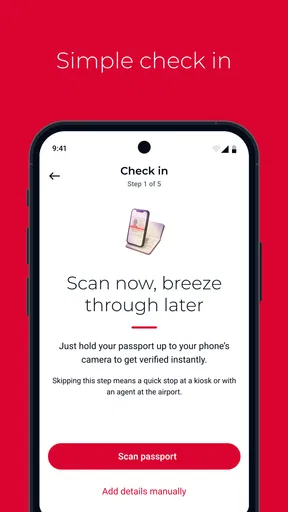
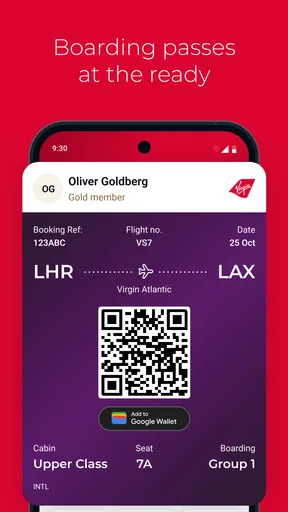
- Easy mobile check-in and access to boarding passes
- Flight status updates help track delays and gate changes
- Manage bookings and select seats directly in the app
- Useful travel information for Virgin Atlantic passengers
- Supports loyalty account access for Flying Club members
Cons
- Some features require an active Virgin Atlantic booking
- App performance may vary on older devices
- Flight changes and refunds may still require customer support
- Not all airport services are available through the app
- Frequent updates may be needed for reliable performance
FAQs for Virgin Atlantic
What is the Virgin Atlantic app used for?
The Virgin Atlantic app is a convenient travel companion for managing your flight journey from one place. After signing in, you can check upcoming bookings, view flight details, access mobile check-in when available, receive travel updates, and review your Flying Club information. It is especially useful for passengers who want quick access to essential trip information without repeatedly visiting the airline’s website.
Can I book or manage a Virgin Atlantic flight through the app?
Yes, the app is designed to help passengers manage many parts of their Virgin Atlantic booking. Depending on the route and reservation, you may be able to view or change flight details, select seats, add extras, check baggage information, and access booking references. Some changes may be restricted by fare conditions or require contacting Virgin Atlantic directly, so the available options can differ between trips.
Does the Virgin Atlantic app support mobile check-in and boarding passes?
The app can provide access to check-in for eligible Virgin Atlantic flights and may allow you to store or display a digital boarding pass. Availability depends on factors such as your departure airport, destination, ticket type, and passenger documentation. Before travelling, make sure your passport or visa requirements are satisfied and keep a backup of your booking details in case airport connectivity or app access is limited.
Can I track Virgin Atlantic flights and receive travel notifications?
Virgin Atlantic’s app can help you stay informed about your journey by displaying flight information and, where supported, providing updates about schedules, gates, delays, or other changes. Notifications are most useful when enabled in your phone settings, although they should not be considered the only source of information. It is still wise to check airport screens and announcements during your trip.
Is the Virgin Atlantic app free to download, and does it work on every device?
The Virgin Atlantic app is generally free to download, although normal mobile data charges may apply when using it away from Wi-Fi. Compatibility depends on your Android or iOS version and the device’s available storage. Certain features may also require an internet connection and a Virgin Atlantic account or booking reference. Before downloading, check the current store listing for supported operating systems and regional availability.


